
- Go to Customization > Forms > Transaction PDF Layout > Choose PDF Layout
- Highlight the Body Field Element. The border will turn blue.
- On the Editor window on the left, under Element Size, set Height as 1.0.
- Click Save.
0 Comments Click here to read/write comments
Topics: Customization
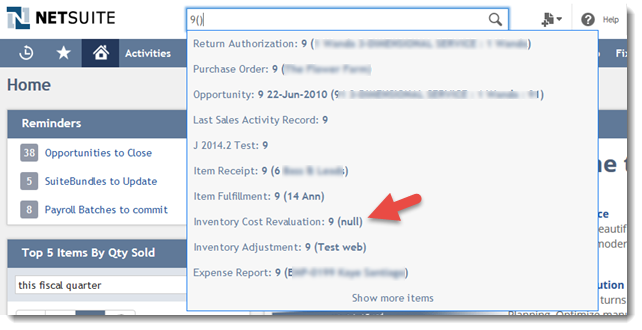
When searching for transactions using Global Search the quick results will display the transaction name followed by the customer/vendor name in parenthesis:
0 Comments Click here to read/write comments
Topics: Customization
This warning message is usually encountered when a user is trying to delete a record in the system and it has child records as indicated under History> Transactions
0 Comments Click here to read/write comments
Topics: Customization
1. Create a Terms and Conditions like a PDF or a Word document.
2. Upload the Terms and Conditions file to the File Cabinet.
3. Navigate to Documents > File > File Cabinet > Find a folder to save the file.
4. Click Add File.
5. When the file is uploaded, edit and mark Available without Login.
6. Copy the URL.
7. Click Save.
8. Navigate to Setup > Customization > Transaction Body Field > New.
- Select Hyperlink in the Type field
- Mark Store Value
- Enter a Label for the field
9. In the Applies to tab mark Sales.
10. In the Display tab
0 Comments Click here to read/write comments
Topics: Customization

A task record stores details about a unit of work to be completed. NetSuite supports the creation of two different types of tasks: CRM Tasks and Project Tasks. The Tasks import supports the import of CRM tasks, not project tasks. CRM tasks, usually labeled Tasks in the NetSuite user interface, do not have to be associated with projects.
0 Comments Click here to read/write comments
Topics: Customization
When the user wants to print the vendor name associated to the item in the Item Fulfillment:
0 Comments Click here to read/write comments
Topics: Customization
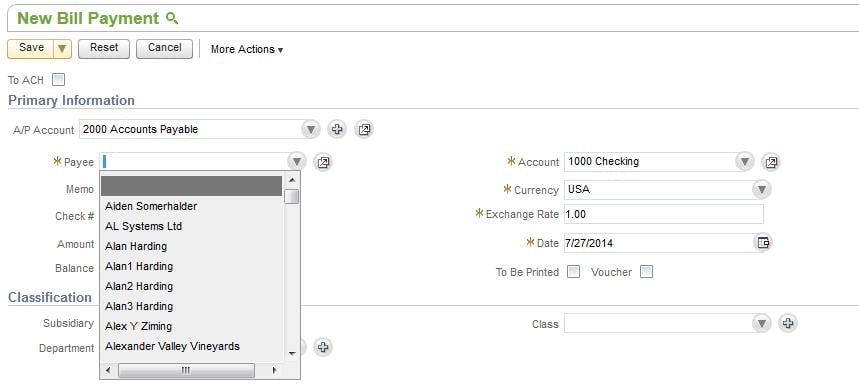
To show only vendor names in the Payee field of the Pay Single Vendor Transaction, go to
0 Comments Click here to read/write comments
Topics: Customization
This issue rises for the role in which there is no custom record permission that we want to open.
0 Comments Click here to read/write comments
Topics: Customization
When a custom record is added as a sublist to another custom record or standard record NetSuite will show Remove option once the record is created.
0 Comments Click here to read/write comments
Topics: Customization





















































 Twitter
 Linkedin
 Youtube
 Google +
 Face Book